
Step-by-Step Guide:
How to Report Personal Income Tax in Singapore (2026)

Filing your income tax in Singapore is famously efficient, but the “Year of Assessment” (YA) process can still feel like a maze if you aren’t prepared. In 2026, the Inland Revenue Authority of Singapore (IRAS) has further streamlined the digital experience via the myTax Portal.
Whether you’re a first-time filer or a seasoned professional, this guide walks you through the exact steps to ensure your 2026 tax return is accurate and filed on time.
Before You Begin: Do You Actually Need to File?
For YA 2026 (which covers income earned from 1 Jan to 31 Dec 2025), you must file if:
- Your total annual income in 2025 exceeded $22,000.
- You are self-employed with a net profit of more than $6,000.
- You received a notification (Letter/SMS) from IRAS specifically asking you to file.
The No-Filing Service (NFS): If you received a notification saying you are on NFS, you don’t need to file. However, you should still log in to verify that your auto-included income and reliefs are correct.
Phase 1: Preparation & Deadlines
Mark these critical dates for 2026:
- 1 March 2026: e-Filing opens.
- 15 April 2026: Deadline for paper filing.
- 18 April 2026: Deadline for e-Filing (Recommended).
What you need:
- Singpass: Ensure your app is updated for a smooth login.
- IR8A Form: Only if your employer is not in the Auto-Inclusion Scheme (AIS).
- Rental Records: If you earned income from property.
- Business Accounts: If you are a sole proprietor or freelancer.
Phase 2: The 8-Step E-Filing Process
Step 1: Log into the IRAS myTax Portal
Navigate to the IRAS myTax Portal. Select “Personal Tax” and log in using your Singpass.
Step 2: Access Your Tax Overview
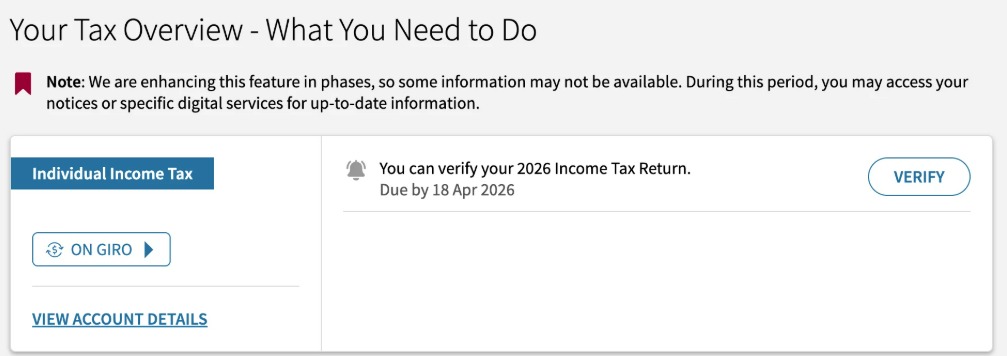
Once in, look for the section “Your Tax Overview – What You Need to Do.” Click the “Verify” button to start reviewing your YA 2026 return.
Step 3: Verify Employment Income
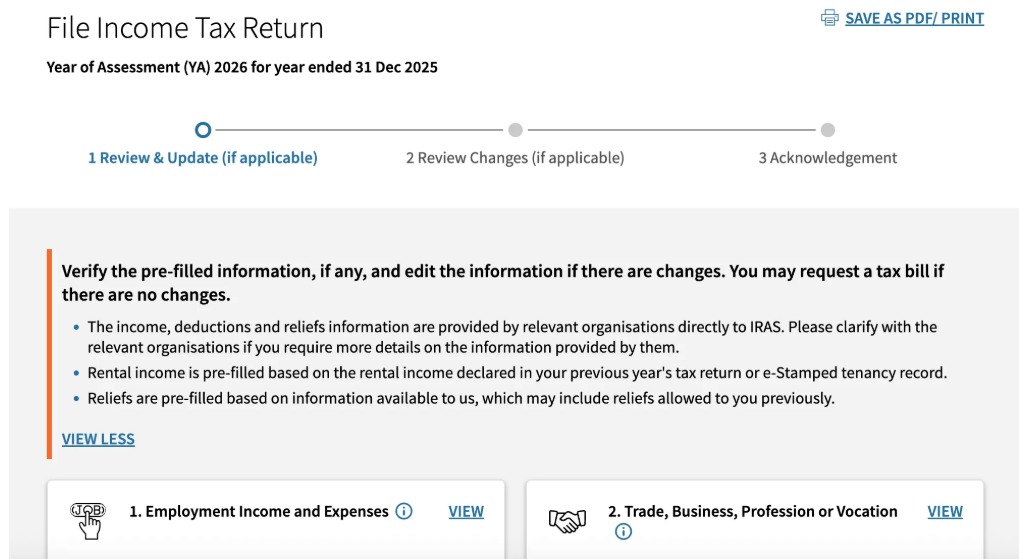
If your employer is under the AIS, your salary and bonus details are already pre-filled.
Action: Compare the digital figures against your payslips. If you notice a discrepancy, or if you changed jobs in 2025 and an employer is missing, click “Add New” to declare the additional income.
Step 4: Declare Trade, Business, or Professional Income
This is for freelancers, PHV drivers, and business owners.
Note: In 2026, many platform workers will see pre-filled data. Ensure your “Adjusted Profit” (Revenue minus allowable expenses) is accurately reflected.
Step 5: Report Other Income (Rental & Royalties)
If you own a tenanted property, ensure the rental income is declared here.
Pro Tip: You can usually claim a flat 15% of gross rent as expenses, or opt to claim actual expenses (interest on mortgage, repairs, etc.).
Step 6: Review Deductions, Tax Reliefs & Rebates
This is where you save money. The system pre-fills common reliefs like Earned Income Relief and CPF Relief.
Manual Entry Required: If you made a donation to a charity that doesn’t have your NRIC, or if you are claiming Course Fees Relief (up to $5,500), you must enter these manually by clicking the “Add New” button.
Cap Alert: Remember that total personal tax reliefs are capped at $80,000.
Step 7: Preview Your Tax Bill
Before clicking submit, the portal generates a Tax Computation. This shows:
- Total Income – Total Reliefs = Chargeable Income.
- The estimated tax amount you will actually pay.
Step 8: Submission and Acknowledgement
Click “Submit.” Ensure you see the Acknowledgement Page. Save a PDF copy for your records. This is your proof of filing.
Phase 3: After Filing – The NOA
From mid-April to September 2026, you will receive your Notice of Assessment (NOA).
- Review it: If IRAS made a mistake, you have 30 days from the date of the NOA to file an “Objection to Assessment” via the portal.
Payment: Tax is typically due within 30 days of the NOA date. Most Singaporeans use GIRO to split the payment into 12 interest-free monthly installments.
Summary Checklist for Mdm Chong Readers
- Checked if I am on the No-Filing Service (NFS).
- Logged in before 18 April 2026.
- Verified pre-filled employment income.
- Claimed eligible parent, child, or course fee reliefs.
- Saved the Acknowledgement Page after submission.
Conclusion: Don’t wait until the 17th of April to log in. Systems can be slow during peak periods. By following this step-by-step guide, you ensure you stay compliant with IRAS while keeping as much of your hard-earned money as possible through eligible reliefs.

Need Help Filling Your Taxed?
Taxes in Singapore can be straightforward, but optimizing your reliefs to stay below the $80,000 cap requires strategic planning. If you’re feeling overwhelmed or want to ensure you haven’t missed any lucrative deductions for YA 2026, we are here to help. Contact Mdm Chong today for a personalized tax consultation and let us help you maximize your wealth while staying fully compliant.